
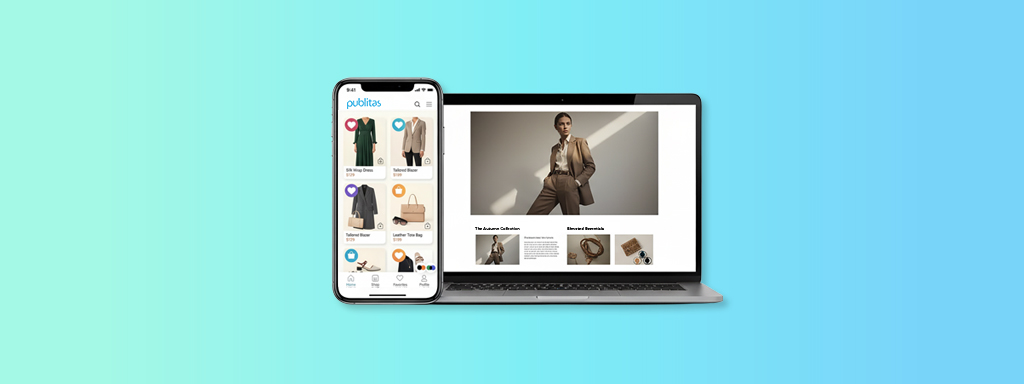
The conversation around lookbooks vs catalogs once sat on opposite ends of that spectrum; one built for storytelling, the other for structured product exploration. Today, those boundaries are fading.
Shoppers want to browse like they’re flipping through a magazine, evaluate like they’re on an eCommerce site, and buy without friction. The challenge for retailers is understanding when to deliver inspiration, when to deliver detail, and how each format influences discovery, engagement, and conversion.
In this article, we explore the differences between a lookbook and a catalog, how each supports specific moments in the buyer journey, and how brands can use both formats to guide shoppers from interest to purchase.
What Is a Lookbook?
A lookbook is a curated collection of styled photographs created to showcase a brand’s aesthetic, mood, or creative vision. It highlights how products can be worn or used, focusing on storytelling and visual inspiration rather than detailed product information.
What Is a Catalog?
A catalog is an organized listing of products that provides essential information such as descriptions, prices, specifications, and ordering details. Its primary purpose is to help customers understand what is available and make purchasing decisions.
Key Differences Between Lookbooks and Catalogs
Lookbooks and catalogs still play fundamentally different roles in how shoppers engage. The simplest way to understand the distinction is by looking at how each format supports the shopper’s mindset.
Purpose: A lookbook pulls people into a story, creates a feeling, and sparks desire before they think about the specifics. A catalog, on the other hand, helps them compare and evaluate, it gives the structure, prices, and product details they need when they’re closer to making a decision.
Content Style: Lookbooks rely on lifestyle photography, styled scenes, and editorial pacing to highlight emotion and context. They focus on impact, not volume. Catalogs take the opposite approach. They use structured product grids and consistent layouts so shoppers can scan quickly, compare options, and navigate larger assortments without losing their place.
Interaction Model: Lookbooks guide people through a visual flow where the narrative leads the experience. Catalogs offer a more structured system. Navigation menus, categories, filters, and product pop-ups help shoppers move intentionally through a wide range of items.
Audience Behavior: Lookbooks resonate most with early-stage shoppers who are browsing out of curiosity or discovery. These shoppers want ideas before specifications. Catalogs align better with mid-and late-stage buyers who already know what they’re looking for and need information to validate their choices or compare alternatives.
Understanding the difference between lookbooks and catalogs helps you match format to intent. Lookbooks build momentum by inspiring shoppers early, while catalogs provide the structure people rely on when they’re ready to evaluate products more closely. When you recognize how each format shapes behavior, you can design content that supports every stage of the buyer journey without forcing one format to do the job of the other.
When to Use a Lookbook
Lookbooks work best when the goal is to introduce a story, build desire, or shift how shoppers perceive a collection. They’re ideal when visual context matters more than detailed comparison.
Common use cases include:
- Seasonal fashion drops: When trends, styling, and mood set the tone for the season.
- Editorial campaigns: When the brand needs a strong narrative to carry the message.
- Lifestyle or luxury collections: When presentation and emotional resonance influence buying behavior.
- Product launches: When the purpose is to spark interest and shape the early conversation.
- Influencer- or creator-led content: When social-style storytelling guides discovery.
Lookbooks succeed when the brand wants to elevate perception and create momentum before buyers start evaluating the finer details.
When to Use a Catalog
A hybrid approach is increasingly common in lookbook vs catalog for eCommerce strategies. They’re both built for shoppers who want structure; people who arrive with intent and need information to make confident decisions.
Catalogs are most effective for:
- Large assortments: Retail, home, grocery, beauty, and electronics, where breadth matters.
- B2B or wholesale ordering: Where buyers rely on specifications, pricing, and volume details.
- Product comparison: When shoppers need consistent formatting to evaluate options.
- Price-led campaigns: Weekly flyers, promotions, and sales cycles where speed and accuracy matter.
- Mid- and late-stage buyers: Shoppers who already know what they want and are validating details.
Catalogs perform well when the primary goal is to reduce friction, surface accurate product data, and shorten the path to purchase.
When to Use Both Formats Together
A hybrid approach can be one of the most effective ways to guide shoppers from inspiration to action. Some campaigns demand emotional storytelling. Others require structured product detail. But certain moments in the buyer journey call for both in the same experience, especially as digital behavior accelerates.
Shoppers move faster than ever. They scroll through inspiration, tap into product detail, and jump back into browsing within seconds. A blended approach helps you meet these behaviors without forcing shoppers to change platforms or lose momentum. Still, retailers should be selective. A hybrid only works when the story and the assortment genuinely benefit from being presented together, not when the format becomes cluttered or confusing.
Below are scenarios where combining lookbook-style storytelling with catalog-style clarity is valuable:
1. Seasonal Campaigns With Large Assortments
When a seasonal drop (holiday, summer, Black Friday) needs both inspiration and breadth, a hybrid approach works well. The story sets the mood, while shoppable product sections offer quick access to the full assortment.
2. High-Consideration Purchases
Categories like furniture, home décor, and fashion basics often require both vision and detail. A sofa looks better in a styled room, but its dimensions, configurations, and materials must also be clear. Showing both in one experience reduces friction.
3. Launches Where Narrative Drives Interest but Product Depth Matters
For brand promos, trend edits, or capsule drops, a story-led introduction pulls attention in. But the ability to dive into specs, variants, or inventory strengthens the path to purchase.
4. Cross-Sell or “Complete the Look” Campaigns
Lookbooks show how products work together. Catalog-style overlays reveal prices, colors, and availability. This combination boosts average order value without overwhelming the shopper.
5. Markets With Varied Buyer Stages in One Audience
When your audience spans early explorers and ready-to-buy shoppers, a hybrid helps serve both without running separate campaigns.
6. Content That Needs to Travel Across Channels
When you use different channels like social ads, email, and landing pages, you often drive traffic into content that must do more than one job. A hybrid layout ensures you’re not forcing a single-format experience onto mixed-intent visitors.
Blending narrative and product detail used to require parallel workflows and heavy manual effort. Modern platforms that support interactive templates, product overlays, and feed automation simplify that work and reduce duplication. Interactive elements, rich media, and fast-loading, mobile-first layouts make it easy to create story-led pages that still connect directly to product detail. Live product feeds, automated SKU tagging, and product overlays keep information accurate without rebuilding layouts. What used to be a slow, two-track workflow is now a single, flexible system that lets retailers combine inspiration and clarity in one seamless experience.
Bringing Narrative and Product Detail Into One Experience
Once a hybrid approach makes strategic sense, the next challenge is execution. Teams need an editor that supports both story-led layouts and product detail in one environment so they can update content without duplicating work.
Creating Story-Led, Visual Experiences
Platforms that support immersive, editorial-style layouts and full-bleed, mobile-first design let teams build narrative pages without heavy development. Instead of adapting print files, teams can work with rich media like video, GIFs, image sequences, and animations to build depth without custom development. Because the platform emphasizes natural mobile scrolling and fast load times, shoppers stay engaged in the narrative rather than fighting the interface.
Delivering Accurate, Product-Rich Detail
That same experience can also hold accurate product information without breaking the visual flow. Live product feeds update pricing, SKUs, and availability in real time, eliminating the need to rebuild layouts whenever something changes. Automated SKU detection and link detection reduce manual tagging, while product overlays reveal the exact details shoppers want (variants, specs, or additional images), the moment curiosity turns into evaluation.
Connecting Both Worlds in One Workflow
Because storytelling elements and product data share the same editor, teams can pair lifestyle scenes with shoppable tags on a single spread. Hybrid templates make it simple to pair full-width imagery with product carousels or structured grids, creating a natural progression from mood to detail. By keeping story elements and product data in the same editor, teams avoid exporting, duplicating, or switching tools; both formats can be managed from a single workflow that scales across campaigns.
Building Content That Adapts to How People Shop
This unified approach continues through the operational layer. Teams can duplicate and version content for regions or languages in minutes, test different combinations of story-led and product-led layouts, and use analytics to see how far shoppers scroll and where they click. Because everything is optimized for mobile from the start, both inspiration and detail perform well in the fast, nonlinear patterns that define modern digital shopping.
Case Study: Coulisse
Coulisse, an international blinds and window-coverings brand, modernized its catalogs by blending functional product information with styled, in-context visuals. Instead of producing a full lookbook, they enhanced their catalog pages with editorial-style room scenes showing how their blinds and fabrics appear in real homes. Using Publitas, they connected these inspirational images directly to live product data through PIM and ERP integrations, giving shoppers the visual context typically found in a lookbook while keeping the accuracy and structure of a catalog. After the change, Coulisse reported higher engagement and longer sessions. The team used page-level metrics to guide follow-up content decisions that balanced practical detail with styled imagery.
Not Lookbooks vs Catalogs: A combined approach
Lookbooks and catalogs aren’t opposing formats anymore. They play complementary roles in a world where shoppers move fluidly between inspiration and evaluation. Lookbooks help people imagine what’s possible. Catalogs help them make confident decisions. When both formats work together, you guide the shopper from the first spark of interest to the moment they’re ready to buy.
Leading brands use story-driven content to increase engagement and time-on-page, then convert that interest with clear product detail. If you want to build a content strategy that meets shoppers where they are, you need both.
Want to see how digital lookbooks and catalogs can work together inside a unified workflow? Book a demo with Publitas, and we’ll walk you through what’s possible.
Frequently Asked Questions
What is the difference between a lookbook and a catalog?
A lookbook uses lifestyle imagery and editorial layouts to inspire shoppers. A catalog uses structured product information (prices, variants, and categories) to support evaluation and purchasing.
Which is better, a lookbook or a catalog for eCommerce?
It depends on your goal. Use a lookbook to introduce a collection or shape how shoppers see your brand. Use a catalog when accuracy, clarity, and conversion matter most. Most retailers benefit from using both.
Can you make a lookbook shoppable?
Yes. Digital lookbooks often include product tags, overlays, or clickable hotspots that connect imagery directly to product details or purchase paths.
How do you design a digital lookbook?
Start with a clear story, curate fewer products per page, and use full-bleed imagery or editorial layouts. Then layer in light interactivity that lets shoppers explore products without breaking the visual flow.
Can Publitas create both lookbooks and catalogs?
Yes. You can build narrative-driven lookbooks and structured catalogs in the same workflow, using the same assets and product data, without managing two separate systems.
