
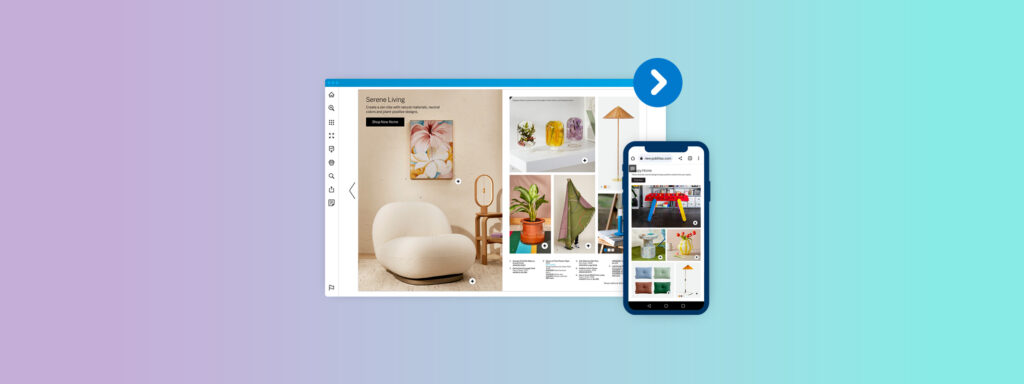
“Flipbook” used to mean either a small booklet with animated pages or a PDF with a page-flip effect. Today, in digital publishing, it usually refers to a fully web-based, interactive format. A modern flipbook functions as a browser-based publication that preserves the structure of a document while adding navigation, interactivity, and measurement.
Modern flipbooks turn static documents into web-native experiences that are easy to open, easy to share, and easy to measure. Instead of sending bulky attachments, you share a link, and instead of guessing what readers do, you see detailed analytics.
This article outlines how flipbooks function today, how they compare to other formats, and where advanced platforms like Publitas extend their value.
What Is a Flipbook in Digital Publishing?
A flipbook is an online publication that uses a page-flip animation to mimic the experience of reading a bound document. A flipbook is typically an HTML5 publication that reproduces the structure of a bound document while operating natively in the browser. The differences between a flipbook and a PDF become clear when you compare how each format loads, behaves, and supports engagement.
- Browser-based: A flipbook opens directly in a web browser via a link, without requiring any downloads or special viewer software like a PDF. Readers click a URL in an email, social post, QR code, or website and begin reading immediately on desktop, tablet, or phone.
- Measurable: A flipbook platform can often track page views, time on page, click behavior, and device type. Teams see how readers interact with catalogs, brochures, proposals, and reports, which is not possible with a basic PDF download.
- Update friendly: A flipbook can usually be updated by replacing the source document while keeping the same URL and embed code as it is hosted online. This avoids the need to resend new files or update links when correcting mistakes or refreshing products, pricing, or copy.
The capabilities of flipbook tools vary significantly, and the performance gap between basic viewers and advanced platforms directly shapes user experience. Many offer very basic features, but this format is extremely versatile in advanced modes.
Modern Features of Digital Flipbooks
To understand today’s flipbooks, it’s essential to look at how the format has shifted from static file viewers to web-native publications. Early flipbooks were little more than PDFs displayed inside a viewer with a page-turn animation. They looked modern at first glance but behaved like static documents, offering minimal interactivity, rigid layouts, and little value beyond basic digital distribution.
Advanced flipbooks have since emerged. They function more like lightweight, web-native publications that offer structured navigation, multimedia, and measurable engagement. The capabilities below illustrate what advanced flipbook platforms enable and how they shape browsing, engagement, and discoverability.
Interactivity
Early flipbooks offered minimal functionality: simple page turns without structured navigation, search, or actionable elements.
Modern flipbooks handle interactivity at the viewer level rather than relying on embedded PDF elements. Readers can use interactive tables of contents, internal navigation jumps, and link-based hotspots to move fluidly through sections. Page elements such as buttons or overlays can direct users to related content or to external destinations.
Some platforms also support product hotspots, which allow readers to click an item within a catalog and access additional details, pricing, or availability sourced from a product database.
Together, these capabilities move the flipbook beyond its static origins and make it a more structured browsing environment.
Multimedia Integration
Traditional flipbooks had no real multimedia capacity. Videos usually opened in external tabs, audio files required separate players, and animated content failed to render in a reliable way.
Modern flipbooks integrate multimedia directly within the viewer. Videos can play inline without redirecting the user. Image galleries can expand over the page without losing context. Slideshows, audio clips, and simple animations can be incorporated to support product storytelling or editorial experiences.
Sharing Options
Sharing used to be a flipbook’s only real advantage. A simple URL and a basic embed code were enough to replace sending large files as email attachments.
Now, flipbooks offer expanded methods for distributing the same publication across different channels. Publishers can generate page-level links, mobile-responsive embed codes, or QR codes that route directly to specific content.
Social previews may render automatically to improve discoverability on platforms where visual cues matter. Email-friendly thumbnails and landing-page embeds give teams more flexibility in how publications are surfaced.
These distribution capabilities position flipbooks within broader digital workflows, making them easier to surface, route, and reuse across channels.
Document Control and Security
Historically, flipbooks provided almost no security. Unlisted links were the primary control mechanism, and anyone who received the URL could access the document. Password protection, if available, is applied uniformly across the entire publication.
Modern flipbooks introduce more flexible security settings. Some tools allow publishers to restrict embedding to approved domains, disable downloading or printing, or limit access through privacy settings. User-level or authentication-based access controls exist in more advanced offerings, although these features remain inconsistent across the market.
These controls support more deliberate governance, particularly for organizations managing sensitive, regulated, or frequently updated materials.
Branding and White-Label Options
In older flipbooks, viewer interfaces, colors, and platform logos were fixed. Organizations often found flipbooks visually misaligned with their brand identity.
Modern flipbooks offer more control. Publishers can apply brand colors, adjust viewer styling, and sometimes define custom themes. Certain platforms support custom domains or the removal of platform branding entirely. Although customization levels still vary, the general trend is toward enabling flipbooks to blend into a company’s existing branding.
Performance and Analytics
Flipbooks originally offered only basic view counters, which provided minimal insight into how readers interacted with content.
Now, flipbooks include analytics that track page views, engagement time, link clicks, navigation paths, device usage, and drop-off points. These insights allow teams to understand which sections attract the most attention and where readers disengage. More capable tools can integrate with analytics platforms, enabling teams to compare flipbook performance alongside other digital assets.
Analytics reposition the flipbook as a measurable, optimizable asset rather than a static, one-time deliverable.
Flipbook tools like Publitas fit into the advanced tier of this evolution by supporting responsive design, interactive product hotspots linked to live product data, customized branding environments, and detailed analytics. Its capabilities reflect how modern flipbooks have moved far beyond their static origins into tools that support ongoing digital engagement.
Document Types That Benefit Most From Flipbooks
Flipbooks are most effective when documents rely on visual layout, multi-page structure, and clear navigation. Not every asset translates well into this format, but certain document types consistently benefit because the flipbook viewer enhances how readers browse, skim, and revisit content. These document types show where flipbooks consistently enhance browsing efficiency, merchandising clarity, and update workflows.
- Catalogs: Product catalogs and buyer’s guides are among the strongest fits for flipbooks. Readers can navigate large assortments using page thumbnails, category markers, and hotspot links that open product detail pages. Teams benefit from central updates, especially when pricing or availability changes, without redistributing files.
- Magazines and Editorial Publications: Lifestyle, fashion, and trade magazines work well because the format preserves visual layouts while enabling richer media such as video, GIFs, or links to extended content. Flipbooks maintain the editorial pacing of print but add digital flexibility.
- Brochures and Pamphlets: Service brochures, destination guides, and event materials translate naturally into flipbooks because teams can update content centrally and publish instantly. Readers always see the most current version, whether they access it through a link, embed, or QR code.
- Portfolios and Case Collections: Visual portfolios for designers, photographers, and agencies benefit from full-screen viewing, rich imagery, and optional embedded video. QR access also helps portfolios circulate more easily without requiring file downloads.
Across these formats, flipbooks deliver value by turning multi-page, visually driven content into a structured digital experience that is easy to update and easy to distribute. Their strength lies in supporting documents where layout matters, navigation matters, and central management reduces operational friction.
How Publitas Helps Retailers Move From Content to Commerce
Once teams identify the document types that work well as flipbooks, the next question becomes how to make those publications do more than inform. Publitas focuses on this problem by adding the layers required for actionability and measurable outcomes. Catalogs, brochures, and lookbooks can connect to live product feeds so pricing, availability, and variants update automatically. Product hotspots and overlays provide direct paths to product pages or carts, reducing the steps between discovery and purchase.
Publitas supports regional, audience, and channel variations from a single source publication, reducing duplication and improving operational consistency. A single publication can adapt its content for different markets while maintaining consistent branding and data. This allows retailers to integrate flipbooks into campaign orchestration, merchandising workflows, and always-on product discovery.
On the measurement side, Publitas provides analytics that show how readers move through a publication, which pages influence engagement, and where commercial interest is strongest. A/B testing and performance insights help teams refine layouts, merchandising, and calls to action based on real behavioral data.
Together, these capabilities allow retailers to use flipbooks as revenue-driving surfaces rather than passive documents.
How to Make a Digital Flipbook Step by Step
Most teams only understand what a flipbook is once they create one. On Publitas, the process moves quickly from a static PDF to an interactive, mobile-optimized publication. The workflow stays consistent and can be completed in a few simple stages.
Step 1: Prepare your content
Prepare a structurally sound PDF with correct sequencing, high-resolution assets, and up-to-date product information. If you are working with a catalog, make sure your product data is accurate so hotspots can pull the right information later.
Step 2: Upload your PDF
Upload the PDF to Publitas. The platform converts it into an online publication and automatically selects an appropriate viewing mode. Verify that all pages render accurately and that typography, imagery, and spacing remain consistent.
Step 3: Apply branding and layout preferences
Set your logo, colors, and viewer settings so the publication matches your brand. Configure whether it displays as a spread, single page, or mobile-first scrolling view, and assign a custom domain if needed.
Step 4: Add interactivity
Use the editor to place hotspots, links, videos, images, or forms. If a product feed is connected, hotspots can automatically display live pricing, SKUs, and availability. Add-to-cart paths or overlays can be enabled for shoppable catalogs.
Step 5: Configure privacy, SEO, and analytics
Choose whether the publication is public, unlisted, password-protected, or restricted to certain domains. Add SEO titles and descriptions. Ensure analytics are active so you can track page views, clicks, and navigation.
Step 6: Publish and distribute
Publish the flipbook and use the generated link or embed code across your website, email, social channels, QR codes, or partner networks. If needed, schedule its launch to match a campaign.
Publitas includes an online editor for post-upload refinement, enabling teams to adjust layouts, hotspots, and media without re-entering design software. You can edit pages, place hotspots, add media, adjust layout elements, and refine the viewing experience directly in the browser. This gives teams more control over the publication after upload and simplifies ongoing updates as content, products, or campaigns change. Completing these steps gives you a ready-to-publish digital flipbook.
Turn Your Flipbook Into a Revenue Channel With Publitas
The strategic value of a flipbook lies in how effectively it connects product discovery, content, and commerce. Publitas turns static publications into actionable surfaces where shoppers discover products, explore assortments, and move naturally into buying paths. By connecting live product data, powering shoppable hotspots, and providing analytics that reveal what influences engagement, Publitas gives retailers a direct line between content and commerce.
Teams evaluating how digital publications can contribute to measurable commercial outcomes can use Publitas to assess fit across merchandising, engagement, and conversion workflows.
Book a demo to experience Publitas in action.
Frequently Asked Questions
What is the purpose of a flipbook?
The purpose of a flipbook is to turn traditionally static documents into digital experiences that are easier to access and more engaging to explore. By combining familiar page-based structure with online navigation, multimedia, and measurement, flipbooks help organizations present long-form or visual content in a way that supports both communication and insight into how readers interact with it.
What is the difference between a flipbook and a PDF?
A standard PDF is a fixed file designed for printing or static viewing. It usually requires downloading and offers no insight into reader behavior. A flipbook is hosted online, opens instantly in a browser, supports interactive elements such as links and media, and tracks how readers engage with each page. It functions more like a web experience than a traditional document.
Are flipbooks good for SEO?
Flipbooks can support SEO when the platform allows search engines to index text and metadata. Titles, descriptions, and URLs can be optimized, and internal links help structure content. While not as powerful as a fully built webpage, an SEO-capable flipbook can appear in search results for branded queries, product terms, or publication titles, depending on how it is configured.
Can a flipbook be made interactive?
Yes. Most modern flipbook platforms allow interactive features such as links, page jumps, videos, image pop-ups, forms, and hotspots. These elements help guide readers, highlight key content, and encourage actions such as visiting a product page or submitting a form. Interactivity varies by platform, but many tools support at least basic enhancements.
Is a flipbook mobile-friendly?
Most current flipbook platforms are designed to be responsive. Pages scale to smaller screens, navigation controls adjust for touch, and some platforms provide mobile-first layouts that behave more like scrollable pages. This ensures that the publication remains readable and easy to navigate on phones and tablets.
What’s the difference between a flipbook and a digital catalog?
A flipbook is a general format for presenting multi-page documents online. A digital catalog is a specific type of publication focused on product discovery and often includes links to product pages, pricing, and merchandising content. Many digital catalogs are delivered as flipbooks, but not all flipbooks function as catalogs. The distinction depends on whether shoppable or product-driven features are included.
Do retailers still use flipbooks today?
Yes. Retailers continue to use flipbooks for weekly ads, seasonal catalogs, lookbooks, and campaign materials. The format remains popular because it is easy to publish, works across devices, and supports product linking and analytics. Many retailers integrate flipbooks into omnichannel strategies where customers browse online before purchasing in-store or through e-commerce channels.
