Share article
Most digital catalogs still present products as static grids, leaving shoppers without clear direction. As a result, product evaluation slows, and conversion suffers. Visual merchandising for digital catalogs improves how products are seen, compared, and prioritized. In practice, this means structuring layouts to guide attention and reduce decision friction.
Research shows that 94% of shoppers engage with digital channels during their journey, increasing the importance of catalogs that support clear discovery and comparison. Understanding how to use visual merchandising in digital catalogs alongside digital catalog design best practices enables teams to create clearer paths to purchase. This guide outlines the techniques that deliver measurable impact and how to apply them without overhauling your catalog from scratch.
Why Most Digital Catalogs Underperform (And What’s Missing)
Most digital catalogs underperform because they are built as static publishing outputs rather than structured buying environments. The result is limited usability, weak product evaluation, and lower conversion. Here’s why digital catalog fails.
- Lack of “Digital-First” Content: Static visuals provide limited context. Without interactivity, search, or product-level engagement, shoppers cannot evaluate products efficiently.
- Overwhelming User Experience (UX): Flat layouts and unstructured product grids create decision fatigue. Without a clear hierarchy or grouping, shoppers lack direction and slow down at the evaluation stage. This is where effective catalog merchandising strategies are missing, as products are not organized to guide attention or support comparison.
- The “Print-to-Digital” Mistake: PDF-based catalogs create friction on mobile, load slowly, and cannot reflect real-time product data. They replicate print limitations instead of enabling digital behavior.
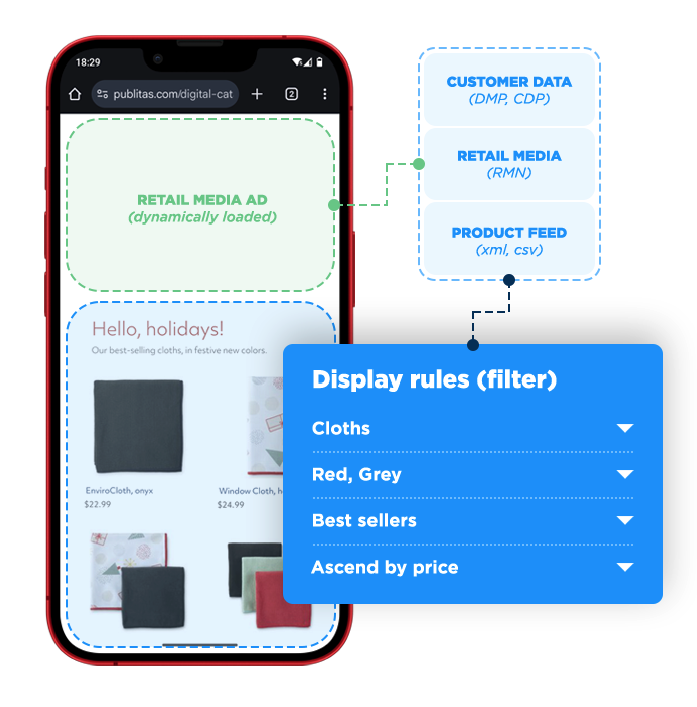
- Disconnected Data and Poor Personalization: Catalogs that are not linked to product feeds or backend systems show inconsistent pricing and availability. They also fail to adapt content based on shopper intent.
What’s Missing and How to Fix It
| Missing Capability | What to Implement |
| Mobile-first usability | Design for fast loading, responsive layouts, and touch-friendly interactions |
| Real-time product accuracy | Sync with PIM or ERP systems to keep pricing and availability updated |
| Product context | Use video, interactive elements, and detailed product views |
| Performance visibility | Track engagement, clicks, and conversion behavior to optimize layouts |
| Merchandising structure | Group products by use case, bundles, or intent rather than internal categories |
To perform effectively, digital catalogs need to function as interactive, data-connected experiences that guide shoppers toward decisions, not just display products.
What Visual Merchandising Means in a Digital Catalog Context
Visual merchandising for digital catalogs is the deliberate structuring of products using layout, imagery, and interactive elements to guide attention and support buying decisions. It moves beyond static listings by adding context, prioritization, and clearer paths to action.
Key components include:
- Homepage focus: Highlight key products or offers to capture attention immediately
- Product imagery: Use high-quality visuals, zoom, and video to support evaluation
- Layout structure: Organize products with a clear hierarchy and intuitive grouping
- Product bundling: Surface complementary items to increase basket value
- Social proof: Integrate reviews or user-generated content to build confidence
- Interactivity: Add elements like hotspots or quick-view features to reduce friction
Together, these elements help replicate in-store decision support in a digital format, improving both engagement and conversion.
The 5 Visual Merchandising Principles That Impact Catalog Performance
High-performing catalogs are structured around how buyers scan, compare, and decide. These principles reflect core digital catalog design best practices, focusing on guiding attention, improving product evaluation, and supporting conversion.
1. Structure for Scanning, Not Reading
Buyers scan digital catalogs rather than read them. Layouts built around dense text and uniform grids underperform because they fail to guide attention. Structuring for scanning means prioritizing imagery, keeping key details visible, and using contrast and spacing to signal importance. This is a core digital catalog design best practices principle that is often overlooked.
2. Control Product Visibility with Hierarchy
Give priority products more space and stronger placement. Size, position, and contrast should reflect commercial importance.
3. Use Product Adjacency to Increase Basket Size
One of the most commercially direct visual merchandising techniques for ecommerce catalogs is deliberate product adjacency. Place complementary items together to encourage additional purchases. Grouping by buying intent is more effective than grouping by category.
4. Design Entry Points That Capture Intent Quickly
Buyers do not move through catalogs sequentially. They enter via links or sections aligned to their intent, making each section a critical entry point. Effective design requires a clear visual anchor, immediate context, and a direct path to priority products. These catalog layout design decisions determine whether shoppers continue exploring or drop off.
5. Guide Attention with Visual Cues (Not Just Layout)
Use imagery, colour, and spatial contrast to direct focus. Small visual adjustments can influence which products receive the most attention. For example, a bold colour block in one corner of a spread creates a visual magnet that buyers unconsciously move toward.
What This Looks Like in Practice (Before vs After Thinking)
The difference between an unstructured catalog and a merchandised one is not always obvious from the outside, but it shows up clearly in engagement metrics. The table below illustrates the practical contrast across key design and layout dimensions.
| Dimension | Typical (Underperforming) Catalog | Merchandised Catalog |
| Opening spread | Brand logo + generic hero image | Hero visual tied to seasonal intent + clear CTA |
| Product sequence | Alphabetical or SKU-ordered | High-margin/high-velocity products front-loaded |
| Visual hierarchy | Uniform grid, equal product sizing | Featured products larger; complementary items secondary |
| Product adjacency | Items grouped by category only | Complementary items co-located to prompt bundle behaviour |
| Calls to action | None, or buried in footer text | Contextual CTAs adjacent to featured product visuals |
| White space | Minimal, Pages packed with product | Deliberate breathing room around hero products |
| Navigation aids | Page numbers only | Visual anchors, section markers, and intent-based entry points |
For example, brands using Publitas often apply these principles by combining hero visuals with shoppable product groupings, allowing shoppers to move directly from discovery to product detail without leaving the catalog.
How to Apply Visual Merchandising Without Rebuilding Your Catalog
The most practical approach to improving visual merchandising for digital catalogs is to work with the catalog you have, rather than waiting for a full redesign cycle. Here is a structured way to approach it:
- Audit your current catalog against performance data: Identify pages or sections with the highest drop-off or lowest interaction rates. These are your priority areas.
- Map product placement to commercial priority: List high-margin and high-velocity products and ensure they appear in prominent positions.
- Review product adjacency logic: Evaluate the catalog from a buyer perspective and reorganize groupings based on buying behavior, not just categories.
- Add visual hierarchy to flat layouts: Increase image size for key products, introduce whitespace, and reduce the visual weight of secondary items.
- Insert contextual calls to action: Place CTAs next to featured products at the point of highest attention, not at the end of sections.
These changes can typically be made within your existing workflow. The goal is to introduce merchandising logic progressively, measure impact, and improve performance over time.
How High-Performing Retailers Think About Catalog Merchandising
High-performing retailers treat catalog merchandising as a performance discipline supported by clear catalog merchandising strategies. They define objectives upfront, such as engagement or click-through targets, and use data to evaluate results after launch. In practice, this translates into five consistent approaches:
- Strategic role of catalogs: Used for storytelling, product curation, and driving both online and in-store traffic.
- Data-driven distribution: Personalized catalogs are sent to high-value segments, with performance tracked beyond direct sales.
- Omnichannel integration: Catalogs connect to digital experiences through QR codes, links, and aligned campaigns.
- Merchandising execution: High-quality visuals and product combinations are used to increase engagement and basket size.
- Content relevance and timing: Catalogs are updated around seasons, launches, and demand, featuring a mix of new and priority products.
Where Visual Merchandising Fits in Your Digital Strategy
Digital catalog merchandising does not operate in isolation. It sits within a broader ecommerce merchandising strategies framework that includes product pages, search and filter logic, personalization, and email distribution. The catalog is one touchpoint in that system, but it often has the highest potential to influence buyer decisions across multiple products at once.
For seasonal or campaign-driven catalogs, this impact is amplified. Merchandising decisions made during production define performance, as changes are limited once live. This increases the importance of upfront planning and structure.
Connecting catalog performance data to the wider ecommerce stack provides actionable insight. Metrics such as product page traffic, conversion rates, and basket composition help teams refine both catalog and product strategies.
For teams scaling this approach, the publishing platform matters. Publitas enables interactive digital catalogs with embedded media, shoppable links, and analytics to support and measure merchandising decisions effectively.
Conclusion: Better Merchandising Drives Better Decisions
Visual merchandising for digital catalogs is not about redesigning pages, but about structuring how products are seen, compared, and acted on. By applying clear hierarchy, product grouping, and intent-driven layouts, teams can reduce decision friction and improve conversion. The most effective approach is iterative. Start with high-impact sections, apply merchandising logic, and measure results. Over time, these incremental improvements compound into stronger engagement, higher basket value, and more predictable performance across catalog-driven campaigns.
FAQs
How is visual merchandising in digital catalogs different from eCommerce merchandising?
eCommerce merchandising focuses on product pages and categories through search, filters, and recommendations. Visual merchandising for digital catalogs operates at an editorial level, structuring how products are presented across pages. It gives more control over sequence, layout, and product relationships.
What metrics should I track to measure catalog merchandising performance?
Track page-level engagement, click-through rate by product placement, and basket composition for catalog-driven sessions. These metrics show how catalog merchandising strategies influence behavior.
How often should I update visual merchandising in a catalog?
For campaign catalogs, update with each new edition using past performance data. For evergreen formats, review every 6 to 8 weeks. Consistent iteration improves results over time.
Can visual merchandising improve performance without adding interactivity?
Yes. Layout, hierarchy, and product grouping can significantly improve performance. Interactivity enhances results, but is not required to apply digital catalog design best practices.
What’s the biggest mistake teams make with digital catalog design?
Focusing on aesthetics instead of buyer behavior. Strong digital catalog design best practices prioritize product visibility, hierarchy, and decision support over visual polish.
Enjoyed this article?
Get the next one straight to your inbox.