Share article
Retailers need catalog layouts that do more than display products. You have to help shoppers scan categories, compare offers, and move from inspiration to product detail without adding friction. A report shows that only 1.4% of online shoppers worldwide converted to purchases in Q1 2026.
Digital Catalog Templates provide a repeatable structure for building catalogs aligned with shopper intent, campaign goals, and retail operations. This blog breaks down 10 proven layouts modern retailers can use to improve product discovery, support shoppable journeys, and create more measurable catalog experiences.
10 Digital Catalog Templates Retailers Can Use
Digital catalog templates help you match catalog structure to shopper intent, campaign goals, and retail workflows. The right layout makes it easier for shoppers to scan products, compare options, and move toward product detail with fewer steps.
Here are 10 digital catalog templates retailers can use to support product discovery, campaign execution, and measurable shopper interaction:
1. Promotional Grid Template
A promotional grid template helps you present offers in a clear, product-led format. It works well when shoppers need to quickly compare prices, discounts, bundles, or featured products.
For marketing teams, this layout supports campaign clarity. Each product block can include an image, price, offer label, and a link to the product detail page, making it easier to guide shoppers from browsing to action.
Best for:
- Supermarkets.
- FMCG retailers.
- Discount retailers.
2. Category-Based Catalog Template
A category-based catalog template organizes products by collection, product type, or use case. It helps shoppers move directly to the section that matches their needs instead of browsing every page.
For retail teams managing large assortments, this layout improves navigation and merchandising control. You can prioritize key categories, structure product groups, and connect each section to relevant product pages or shoppable elements.
Best for:
- Department stores.
- Home and living retailers.
- Fashion retailers.
3. Interactive Shopping Template
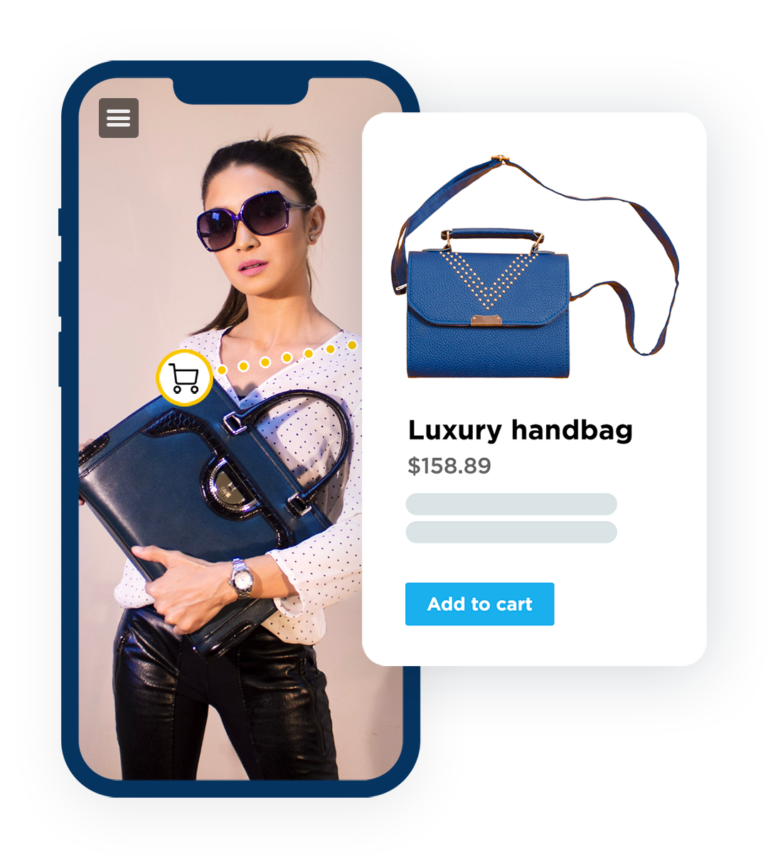
An interactive shopping template uses links, hotspots, product cards, or overlays to connect catalog content with product information. It helps shoppers evaluate products while they are still inside the catalog experience.
This template is useful when you want to reduce the steps between product interest and product detail. E-commerce teams can also track clicks and interactions to understand which products and pages create stronger buying intent.
Best for:
- Home décor brands.
- Sports and outdoor retailers.
- E-commerce-led retail brands.
4. Lookbook Template
A lookbook template presents products through curated collections, outfits, rooms, or styled product groups. It works well when shoppers need context before they compare individual items.
For brand and merchandising teams, this layout supports visual product positioning without losing the path to purchase. Clickable product markers or product cards help shoppers move from a styled scene to specific product details.
Best for:
- Fashion retailers.
- Luxury brands.
- Accessories brands.
5. Lifestyle Inspiration Template
A lifestyle inspiration template organizes products around customer needs, occasions, routines, or environments. It helps shoppers understand how products fit into a real buying context.
This layout is useful when shoppers are still defining what they want. Marketing teams can use it to connect product discovery with use cases, then guide shoppers toward related products or categories.
Best for:
- Beauty and wellness retailers.
- Kitchen and homeware brands.
- Occasion-based retail campaigns.
6. Seasonal Campaign Template
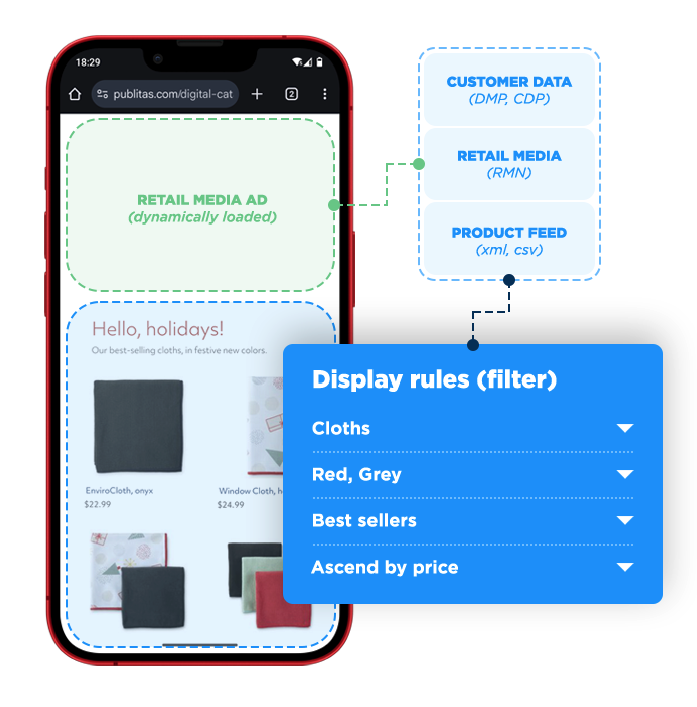
A seasonal campaign template structures product offerings around a specific retail moment, such as the holidays, summer, back-to-school, Black Friday, or end-of-season sales. It helps shoppers understand what is relevant now and where to act.
For marketing teams, this layout creates a repeatable campaign framework. You can update products, offers, links, and visuals while keeping a consistent structure across seasonal promotions.
Best for:
- Fashion and apparel retailers.
- Supermarkets.
- Beauty retailers.
7. New Product Launch Template
A new product launch template introduces a new product, collection, range, or category. It helps shoppers understand what is new, who it is for, and why it deserves attention within the broader assortment.
This layout supports product education and commercial intent in one place. You can combine product highlights, specifications, use cases, and links to product pages so shoppers can evaluate the launch efficiently.
Best for:
- Beauty and skincare brands.
- Consumer electronics retailers.
- Furniture and home brands.
8. Buyer’s Guide Template
A buyer’s guide template helps shoppers compare products based on needs, features, specifications, materials, size, price, or use case. It works best when the buying decision requires more explanation.
For ecommerce and merchandising teams, this layout reduces decision friction. It gives shoppers a structured way to narrow choices before clicking into product detail or adding products to a shortlist.
Best for:
- Electronics retailers.
- Sports equipment retailers.
- B2B and wholesale suppliers.
9. Store Circular Template
A store circular template is built for recurring promotions, weekly deals, local offers, and price-led retail communication. It helps shoppers scan offers quickly and decide whether to shop online or visit a store.
Digital circulars should not simply copy print layouts. You can improve their usability with mobile-friendly sections, linked product offers, category navigation, and clear promotional dates.
Best for:
- Supermarkets.
- Pharmacies.
- FMCG retailers.
10. Brand Story Template
A brand story template connects product discovery with brand positioning, values, quality, sustainability, or product philosophy. It works best when shoppers need more context before they compare products.
For brand teams, this layout helps you explain why the assortment matters while still keeping products accessible. The strongest version links each story section to relevant products, categories, or shoppable catalog elements.
Best for:
- Sustainable retail brands.
- Home and design retailers.
- Specialty retailers with differentiated products.
Also Read: Catalog Marketing Examples That Actually Drive Engagement and Sales
What Makes a Good Digital Catalog Template?
A good online catalog template helps shoppers find products, compare options, and move to the next step with less friction. For your marketing and ecommerce teams, it also creates a reusable structure for campaigns, product updates, and performance tracking.
Here are the core elements that make a digital catalog template effective for modern retailers:
1. Easy product discovery
A strong template helps shoppers identify relevant products without having to browse every page. Clear product groups, readable labels, and logical hierarchy make scanning easier.
2. Mobile-friendly layouts
A digital catalog template should work clearly on mobile. Use clean layouts, readable product information, and tap-friendly interaction points so shoppers can browse and act from smaller screens.
3. Clear category navigation
Category navigation helps shoppers reach the section that matches their needs. This is critical for retailers with large assortments or multi-category campaigns.
4. Promotional flexibility
Retail campaigns change often, so your template should support product swaps, pricing updates, seasonal messages, and new offers without a full redesign.
5. Interactive shopping elements
Interactive elements help shoppers act when they show interest in a product. Links, hotspots, product cards, and shoppable flows reduce the steps between browsing and product detail.
Want to make your catalog images and videos shoppable? Use Publitas interactive media to add product hotspots, CTAs, forms, and interactive media layers that help shoppers move from product interest to action with fewer steps!
How to Choose the Right Digital Catalog Template
Choose a digital catalog template based on shopper intent, campaign goals, and the product journey. The right layout helps shoppers browse, compare, and move toward.
Here are the key factors to consider when choosing interactive catalog templates:
- Choose a layout that matches the shopper’s intent.
- Match the structure to the campaign goal, such as product launches or seasonal promotions.
- Use simpler layouts for low-consideration products and more detailed layouts for products that need comparison, specifications, sizing, or use-case guidance.
- Pick templates that your team can update quickly when prices, inventory, offers, or campaign priorities change.
- Prioritize layouts that work well on mobile, with readable product blocks and clear navigation.
Common Digital Catalog Template Mistakes
Digital catalog templates underperform when they follow print-based habits rather than online shopper behavior. These mistakes create friction in product discovery.
Here are common mistakes in digital catalog templates that retailers should avoid:
1. Using print-first layouts online
Print-first layouts assume shoppers move through pages one by one. Digital shoppers scan, skip, click selectively, and often browse from mobile devices.
2. Overcrowding pages with products
Too many products on one page can make comparison harder. Shoppers need clear product groups, priority items, and visible next steps.
3. Poor mobile experience
Small text, dense product blocks, and hard-to-tap links slow down mobile shoppers. This can reduce the value of an otherwise strong catalog.
4. Weak navigation structure
Weak navigation makes it harder for shoppers to reach relevant sections, especially in large or seasonal catalogs.
5. Missing interactive elements
Static pages limit what shoppers can do after they notice a product. Without links, hotspots, product cards, or shoppable flows, interest may not move into evaluation.
6. No clear path to purchase
A catalog can create interest, but still lose shoppers if the next step is unclear. Shoppers need a direct route to product details, store information, or checkout.
Also Read: How to Create an Engaging Product Catalog That Actually Drives Conversions
How to Measure Whether Your Catalog Template Is Working
A digital catalog template is working when shoppers can find relevant products, interact with key sections, and move toward product detail or purchase with fewer drop-offs.
Here are the key signals to track:
- Catalog opens: Shows whether your campaign distribution is driving shoppers into the catalog.
- Page views: Helps you identify which pages or sections attract attention and which are being skipped.
- Time spent: Indicates whether shoppers are spending enough time to review products, compare options, or read buying guidance.
- Click-through rate: Measures whether links, CTAs, and product paths are clear enough to move shoppers to the next step.
- Product clicks: Shows which products create interest and whether your template supports product-level discovery.
- Hotspot or product card interactions: Helps you understand whether interactive elements are placed where shoppers need more information.
- Conversion pathway data: Tracks whether catalog interactions lead to product pages, cart activity, store information, or other commercial actions.
Want to measure whether your catalog template is working? Use the Publitas catalog data dashboard to track catalog opens, page views, average engagement, bounce rate, CTR, product clicks, link clicks, device data, and geographic performance from day one!
Conclusion
Digital catalog templates help you turn catalog design into a more structured retail workflow. The right template supports how shoppers browse, compare, and move from product interest to the next commercial step. For marketing and ecommerce teams, templates also create consistency across campaigns, product updates, and performance tracking.
Modern digital catalog platforms like Publitas make this easier by supporting interactive elements, product links, shoppable flows, and catalog analytics in one structured experience.
FAQs
1. What is the best digital catalog template for retail stores?
The best template depends on the campaign goal. Use promotional grids or store circulars for offers, category-based templates for large assortments, and lookbooks or lifestyle templates for inspiration-led shopping.
2. What’s the difference between a print catalog template and a digital catalog template?
A print catalog template is designed for fixed-page reading. A digital catalog template is designed for online browsing, mobile use, clickable products, category navigation, and performance tracking.
3. How do interactive digital catalog templates improve conversions?
They reduce the steps between product interest and product detail. Links, hotspots, product cards, and shoppable flows help shoppers act while they are already browsing.
4. How often should retailers update their digital catalog templates?
Update templates when campaign goals, product assortments, shopper behavior, or performance data change. Retailers with weekly promotions may update often, while seasonal retailers may review templates after each major campaign.
5. Can digital catalog software provide reusable templates for multiple campaigns?
Yes. Digital catalog software can support reusable layouts for promotions, seasonal campaigns, product launches, lookbooks, and circulars, helping teams update content faster while maintaining a consistent structure.
Enjoyed this article?
Get the next one straight to your inbox.