Share article
SEO for digital catalogs is the practice of making the pages, products, and content inside an online catalog crawlable, indexable, and rankable in Google. Most digital catalogs fail at this because they are trapped in JS-only viewers, flat PDFs, or single-URL flipbooks that search engines cannot read at the page level. The fix combines platform choice, on-page setup, and structured data.
The verdict: your platform must render HTML per page, expose editable metadata, and support schema. Without those three, no amount of on-page work will make the catalog rank.
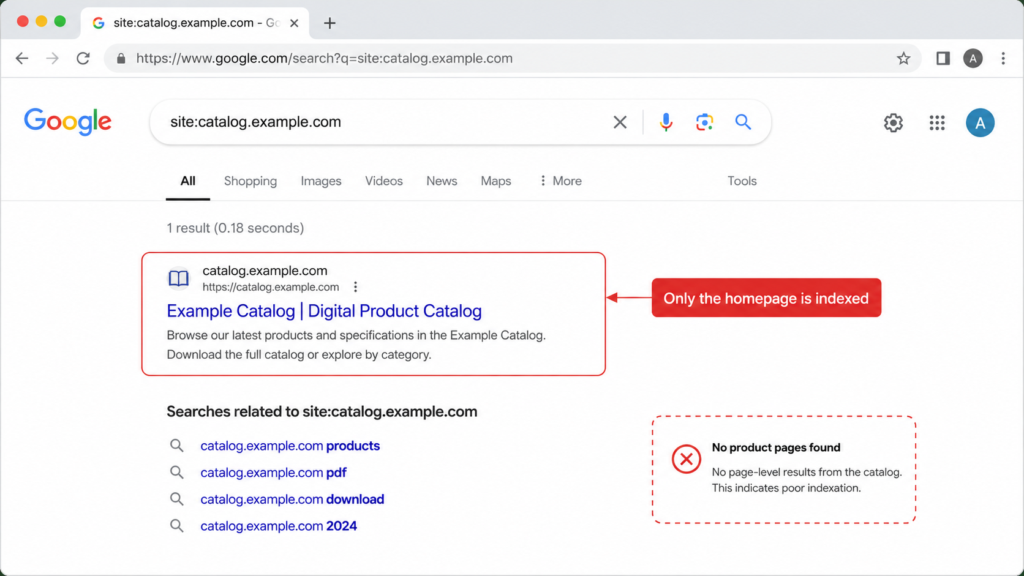
In audits of catalogs migrating from legacy flipbook tools, we regularly see catalogs in which Google has indexed only the cover page. This guide covers what breaks catalog SEO, how to fix it, and how to judge your platform.
Why Most Digital Catalogs Are Invisible to Google
The first failure is the JS viewer trap. Many flipbook platforms render as a JavaScript shell. View-source returns an empty container where your product copy should be. Google can render JavaScript, but content that never reaches the DOM cannot be indexed at all.
The second is the single-URL problem. When your Spring 2026 lookbook lives at /catalog/spring-2026, Google has one page to rank, not 40. Every product and spread inside that catalog competes for the same URL. None of them can win a long-tail query alone.
The third is the metadata gap. Some platforms lock titles, meta descriptions, alt text, and schema at the page level. That sets a hard ceiling on digital catalog Google indexing. You cannot optimize fields the platform will not let you edit, however good your copy is.
The fourth is the orphan problem. Your main navigation does not link to the catalog, and your sitemap does not list it. Google may never find it. Catalogs on a subdomain fail this way most often, because they inherit none of the internal links that make catalog sites work as a discovery channel.
How to Set Up Your Digital Catalog for SEO
The goal is a searchable digital catalog, one Google can crawl page by page, not just link to as a single asset.
- Enable indexing in your platform settings. Many platforms block catalogs by default. Verify: open robots.txt and check for a Disallow rule on the catalog path.
- Set a keyword-relevant URL and catalog title. Include the product or category term. Skip stopwords. Verify: the URL reads cleanly and carries no catalog ID.
- Write a meta description under 155 characters. Frame it as a click promise, not a summary. Verify: preview it in a SERP simulator to confirm it does not truncate.
- Add descriptive alt text to product images and spreads. Describe the product, not the scene. Verify: crawl the catalog and filter for empty alt attributes.
- Enable Product, Offer, and BreadcrumbList schema. Verify: test each page type with Google’s Rich Results Test.
- Submit the catalog sitemap in Google Search Console. Verify: check the Coverage report after two weeks and compare indexed pages against pages submitted.
Add canonical tags if the catalog duplicates copy from your main product pages. The canonical tells Google which version to rank and stops the two from competing. Platforms built for shoppable digital catalogs expose these fields directly.
Google recommends that you place Product markup in the initial HTML. JavaScript-generated markup makes shopping crawls less frequent and less reliable for data that changes often, such as price and stock. Here is a simple Product schema example in JSON-LD:
{
“@context”: “https://schema.org/”,
“@type”: “Product”,
“name”: “Merino Wool Crew Sweater”,
“image”: “https://example.com/photos/sweater.jpg”,
“description”: “Midweight merino crew neck in four colorways.”,
“sku”: “MW-CRW-001”,
“brand”: { “@type”: “Brand”, “name”: “Example Brand” },
“offers”: {
“@type”: “Offer”,
“url”: “https://example.com/catalog/merino-crew”,
“priceCurrency”: “USD”,
“price”: “129.00”,
“availability”: “https://schema.org/InStock”
}
}
Scaling Catalog SEO Across Products and Markets
Hand-written metadata stops working at a few hundred products. Pull templated titles from your product data instead, in a structure such as {Brand} {Product Type} – {Key Feature} | {Category}. Tier the work: hand-craft metadata for top-revenue products, template the long tail. Modern SEO for digital catalogs setups can generate these fields from the product feed automatically. Titles then stay current as the assortment changes, and nobody rewrites them by hand.
Distributors and international retailers publish the same catalog in several languages. Hreflang tags tell Google which version to show in which market. Without them, your English catalog can rank in Germany and cannibalize the German version. Authority splits across two pages that should never compete. Hreflang is a native feature in enterprise catalog platforms, not something you retrofit with tags alone. Confirm support before you commit to a vendor.
Digital Catalog vs. PDF vs. Flipbook: What Actually Ranks
Not every catalog format has the same SEO ceiling, and the digital catalog vs PDF SEO question usually decides the outcome before optimization starts.
| Factor | Traditional Flipbook | HTML-based Catalog | |
| Crawlability | Poor | Poor (JS-locked) | Excellent |
| Per-page URLs | No | Rarely | Yes |
| Metadata control | Limited | Limited | Full |
| Mobile UX signals | Poor | Variable | Excellent |
| Schema support | None | Rare | Native |
Flipbook SEO caps out at whatever the viewer exposes. If organic discoverability matters, HTML5-native catalogs are the only format that competes for page-level rankings.
How to Choose a Digital Catalog Platform for SEO
If you are building a best digital catalog platform for SEO shortlist, use these questions to evaluate Publitas and other vendors.
- Does content render as indexable HTML with per-page URLs?
- Can I edit titles, meta descriptions, and alt text per page?
- Is schema markup (Product, Offer, Breadcrumb) generated automatically?
- Are images served in modern formats (WebP/AVIF) with a catalog sitemap?
- Does the platform support hreflang for multi-market catalogs?
- Does the platform expose editorial signals, such as published and updated dates and brand attribution?
Ask these during the demo, with a live URL on screen. A vendor that fails question one cannot compensate on the other five.
If you weigh specific platforms, we have built detailed comparisons against Issuu, Flipsnack, and FlippingBook that walk through these criteria.
Publitas meets all six criteria natively, but this checklist works for any vendor evaluation.
Frequently Asked Questions
Can Google Index a Flipbook?
Only if it renders as HTML with real text in the DOM. Pure JS-viewer or image-based flipbooks are effectively invisible to search engines. The platform choice determines what Google can see, and no amount of on-page work fixes a catalog that renders as a JavaScript shell.
How Long Does a Digital Catalog Take to Rank?
Typically four to twelve weeks for initial indexation and first rankings, and longer for competitive product terms. Timelines depend on domain authority, internal linking depth, and how fast your platform gets pages into Google’s index. Submit the catalog sitemap on day one to speed up discovery.
What Is the Difference Between Digital Catalog SEO and Ecommerce SEO?
Ecommerce SEO optimizes individual product pages on your main site. Digital catalog SEO optimizes the catalog experience, often on a separate subdomain or path, and needs canonicalization so it does not compete with your product pages. The two work best together: catalogs drive discovery, product pages capture intent.
What Is the Best Digital Catalog Platform for SEO?
Evaluate any platform against six criteria: indexable HTML, per-page URLs, editable metadata, automatic schema, hreflang support, and editorial signals. The right answer depends on catalog volume, market coverage, and how much metadata control you need. Publitas is built against these criteria.
Closing
Catalog SEO is a platform decision as much as a content decision. You can write the best product descriptions in your industry, but the platform you publish them on limits what Google can rank. The retailers and publishers who win organic traffic from SEO for digital catalogs are not the ones writing more. They are the ones on the right infrastructure.
See how Publitas handles catalog SEO out of the box, or compare it against other platforms with the six-question checklist above.
Enjoyed this article?
Get the next one straight to your inbox.